
Based on the car rental company's process model, here are the steps to return your rented car:
Car Return Process
Fill Up Gas in Tank and Head for Return Depot - Ensure the car's fuel tank is full and drive to the return depot.
Empty Car and Return Key - Remove all your personal belongings from the car and return the keys to the rental company.
Return Confirmed - The rental company confirms the return of the car.
Car Returned - The process is complete and the car has been officially returned.
The process also tracks the Return Date as part of the workflow.
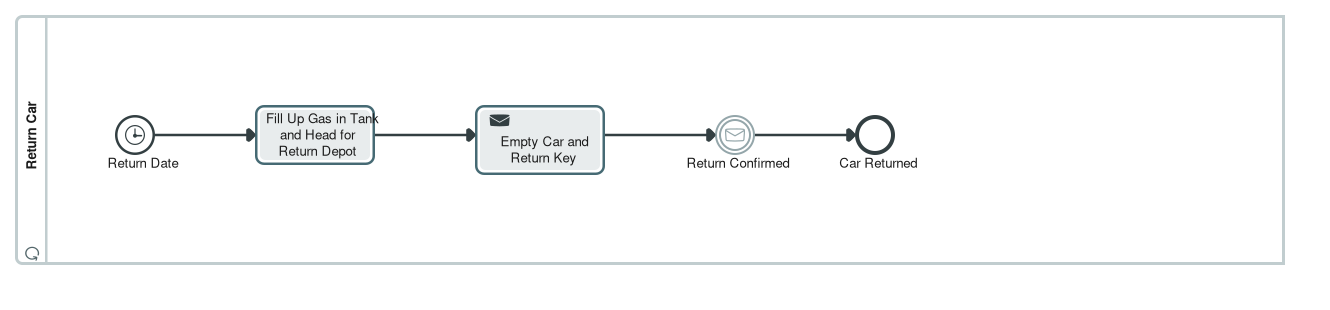
The diagram above shows the complete sequence of steps for returning a vehicle from the Enterprise Modeling Rental Car model.
Based on the Enterprise Modeling Rental Car model, an optional damage check is required under the following specific condition:
Condition for Damage Check
An optional damage check is required when the customer has not taken out fully-comprehensive cover (comprehensive insurance) for the rental contract.
The business rule behind this is: Contract without fully-comprehensive cover requires damage check.
Process Details
When the customer returns the car without fully-comprehensive insurance:
- The rental company performs a damage inspection
- A damage report is filled out as part of the return data
- The findings become part of the contract and reach the invoice through the damage report
The process includes a named path called "Return with Damages Check", which describes the return of the car without fully-comprehensive cover, meaning a damages check needs to be carried out before return can be acknowledged.
Process Flow
The damage check occurs at a diverging gateway in the "Take back Car" process:
- The conditional flow "No Fully-Comprehensive Cover" leads into the damage check and is weighted with a probability of 20 percent
- The second flow (80 percent) skips the check by leading straight to the merge
Related Diagrams
The process is documented in the following diagrams:
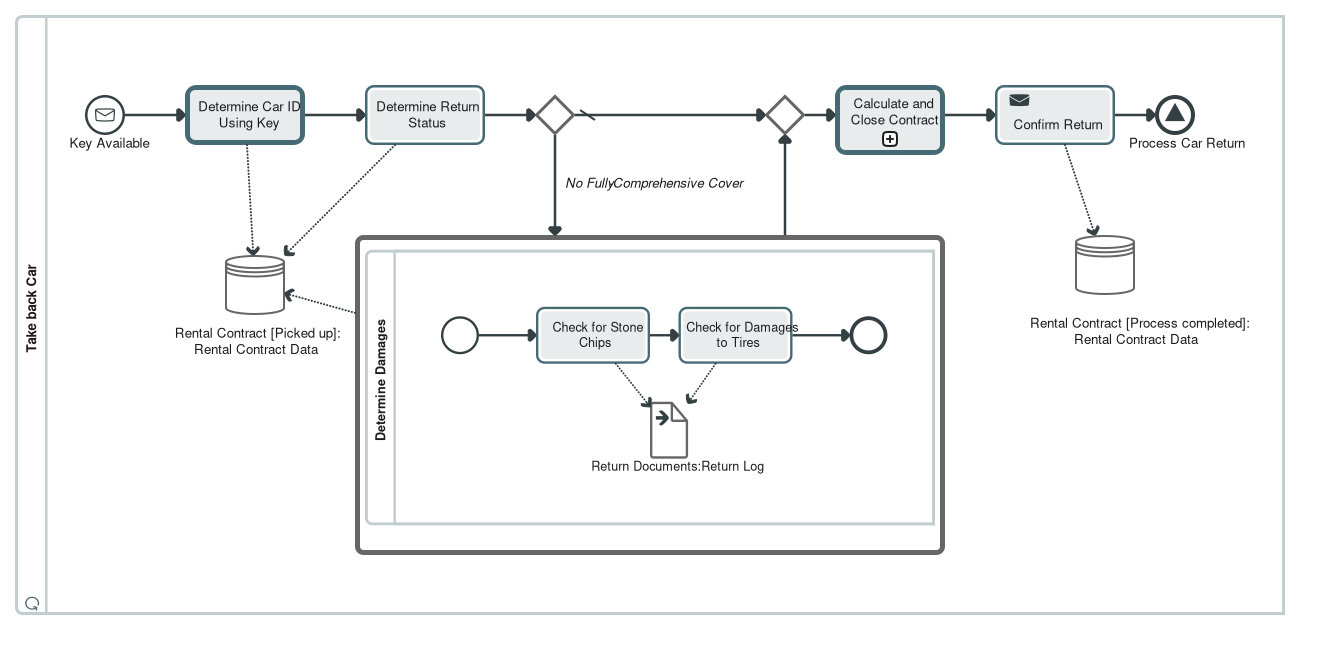
The damage check itself is further detailed in the Fahrzeugrückgabe process, which specifies that if no comprehensive insurance was taken out with the rental contract, a damage check must be performed that results in a damage report.
View other available documents related to car return process
| Document ID | Relevance |
|---|---|
| docid-56304-c3 | Describes the general car return process and customer workflow |
| docid-56304-c6 | Contains economic evaluation of the damage check process |
| kg://inno-440 | Vehicle check-in use case with damage check requirements |
⚠️ Leaving thalabus
You are about to leave the platform and visit an external website:
3. Diverging gateway, described as "Branching for optional damage check." Two outgoing flows. The conditional flow "No Fully-Comprehensive Cover" leads into the damage check and is weighted with a probability of 20 percent; its condition is held as the reusable logical expression "No Fully-Comprehensive Cover". The second flow is the default flow, weighted 80 percent, and skips the check by leading straight to the merge. The business rule behind this is the functional requirement "Contract without fully-comprehensive cover requires damage check".
…The diagram additionally records a named path, "Return with Damages Check", described as "Describes return of the car without fully-comprehensive cover, meaning a damages check needs to be carried out before return can be acknowledged." The path documents the variant through the optional check as a first-class model element rather than leaving it implicit in the branching.
…Car Pick Up. Described as: the driver collects a car they have reserved. On collection, and after completing registration details, the driver only expects to have to show a driver's license, some form of identification and a credit card, so booking information must be easy to retrieve from the driver's identity.
Car Return. Described as: the driver is also the contract partner in consumer business, and the car is returned to one of the rental depots. The key's ID must be enough information to identify the car. If the customer has not taken out fully-comprehensive cover, the car must be checked for damages and a damage report filled out.
The BPMN diagrams described in section 3 detail exactly these stages.
Diagram descriptions
Return (BPMN collaboration diagram)
"Return" is the central collaboration diagram of the model, with 40 diagram members. Its recorded description reads: "Collaboration for return use case. BPMN is used here to describe how return happens from the view of the customer and/or driver and from the view of the rental company." It shows the car return as an interplay of two participants and thereby makes visible exactly where customer and rental company touch each other.
Participants (pools):
Customer, described as "The driver as participant in the collaboration." It references the process "Return Car", carries the partner role "Customer" and represents the actor "Customer".
Car Rental for Private Customers, which references the process "Take back Car". Its recorded description reads "The rental car as participant in the collaboration", although the pool stands for the rental company.
Flow in the Customer pool (process "Return Car", described as "Car return from the view of the customer", process type Non-Executable):
A timer start event ":Return Date" opens the process, described as "The process starts no later than the Return Date." The customer then performs "Fill Up Gas in Tank and Head for Return Depot" ("The customer fills the tank as per the contract and then returns the car to the return depot"), followed by the send task "Empty Car and Return Key" ("The customer removes all belongings and luggage and hands in the key at the return depot"). The customer then waits at the intermediate message catch event ":Return Confirmed", described as "The customer waits for confirmation receipt of return so they can leave the return depot; the process is then finished for the customer." The end event "Car Returned" closes the customer's part: "This is the last part of the process from the view of the customer."
Flow in the Car Rental for Private Customers pool (process "Take back Car"):
Starts at the message event ":Key Available" and runs through key acceptance, recording of the return status, an optional damage check, contract settlement and return confirmation to the signal end event ":Process Car Return". Section 3.2 covers this in detail.
Message flows between the pools:
"Key (Physical)" runs from the customer's task "Empty Car and Return Key" to the start event ":Key Available" in the company pool. The physical handover of the key is therefore what triggers the company-side process.
"Confirmation" runs from the company's task "Confirm Return" to the customer's intermediate event ":Return Confirmed". Only this message lets the customer process continue and finish.
The diagram thus shows a clean handover pattern. The customer brings the car into a defined state, full tank and emptied, and hands over the key; the company accepts, inspects, settles and confirms. The two sides are coupled by these two messages only and otherwise run independently.
Take back Car (BPMN process diagram)
This diagram describes the car return from the rental company's point of view and is by far the most fully detailed process in the model. It is the only one carrying execution times, costs, responsibilities and cost centres throughout, which is also what makes the separate cost view "Drop-Off Car (Activity Based Costing View)" possible: that view shows the same process content under a cost perspective.
Trigger:
Message start event ":Key Available", described as "Event which shows that the key was returned." Expected volume: 3,000 occurrences per year.
Flow:
…The diagram additionally records a named path, "Return with Damages Check", described as "Describes return of the car without fully-comprehensive cover, meaning a damages check needs to be carried out before return can be acknowledged." The path documents the variant through the optional check as a first-class model element rather than leaving it implicit in the branching.
Economic evaluation:
Because times, costs and branch probabilities are all present, the process can be costed. The standard route without a damage check comes to 10 minutes of handling time and 11 EUR of direct cost per return; the route with the check comes to 35 minutes and 16 EUR. Weighted with the recorded 80/20 split, the expected effort is roughly 15 minutes and 12 EUR per return, plus the follow-up step at 15 minutes and 25 EUR. At 3,000 returns per year this is the basis for the activity based costing view and for improvement goals such as "Reduce Manual Labor" and "Enable Self Service".
Calculate and Close Contract (BPMN process diagram)
This diagram describes the commercial close of a rental transaction, with 24 diagram members. It is called from the task "Calculate and Close Contract" in the car return and is therefore a reusable sub-process.
Trigger:
An unnamed start event with an unspecified event definition.
Flow:
1. Determine deposit. The starting point is the deposit lodged at the beginning of the rental; the functional requirements "Deposit" and "Refund of security deposit" belong here. The data object "Rental Contract" feeds this task.
2. Calculate Invoice. Typed as a business rule task, which means the calculation logic is not drawn as control flow but held as a decision. The data object "Damage Report" feeds this task, so damages recorded during the return enter the invoice.
3. Diverging exclusive gateway with three outgoing flows: condition "Additional Demand", condition "Refund", and condition "none" for the case where neither applies, which leads straight to the merge. All three flows point at the same DMN decision "Calculate Invoice" as the decision they use, so the branch conditions are documented in one place rather than three.
4. Debit Additional Demand or Give Refund, depending on the branch taken.
5. Converging exclusive gateway brings the three paths back together.
6. Close Contract. The concluding step of the settlement.
7. An unnamed end event closes the sub-process.
Data:
The data object "Rental Contract" is the central reference of the settlement, the data object "Damage Report" carries the damage findings into it. The rental contract is additionally described in the model as a business object, as the structure definition "Rental Contract Structure", and with its own state diagram "Rental Contract States".
Related views:
The decision requirements diagram "Rental Invoice Calculation" documents the decision logic behind the invoice as DMN, holding the decisions Calculate Invoice, Cost of Repairs, Delayed Return Sanction and Missing Accessories. The application service Payment, realised by the application component Booking System, covers payment in the model, but no serving relationship connects it to this sub-process: on the application side the settlement is not yet wired up, unlike the return, which is served by the application service Car Management.
Unlike the car return, this sub-process carries no execution times, costs or responsibilities: every value is 0 and no task has a resource assignment. The process is structurally complete but not yet evaluated economically.
Determine Damages (BPMN process diagram)
The damage check called from the car return has its own diagram, described as "The process contains tasks for checking a car for damages." Responsibility for the process as a whole lies with the organisational unit Technical Maintenance.
Flow:
An unnamed start event leads into "Check for Stone Chips", described as "The technician checks the car for stone chips, particularly on the windshield." This is followed by "Check for Damages to Tires", described as "The technician checks whether there are any damages to the tires upon acceptance of the returned car." An unnamed end event closes the process.
Data:
…