
Based on the car rental company's process model, here are the steps to return a rented car:
Car Return Process Steps
| Step | Customer Action | Description |
|---|---|---|
| 1. Fill Up Gas | Refuel tank | Fill up the gas tank according to the rental policy (typically Full-to-Full) |
| 2. Empty Car | Remove belongings | Empty all personal belongings from cabin, trunk, and glovebox |
| 3. Return Key | Hand over key | Return the key to the depot agent or use secure drop-box if after hours |
| 4. Inspection | Wait for check | The rental company inspects the vehicle (tires, windshield, bodywork) |
| 5. Confirmation | Receive receipt | Get a return confirmation receipt via email |
Process Diagrams
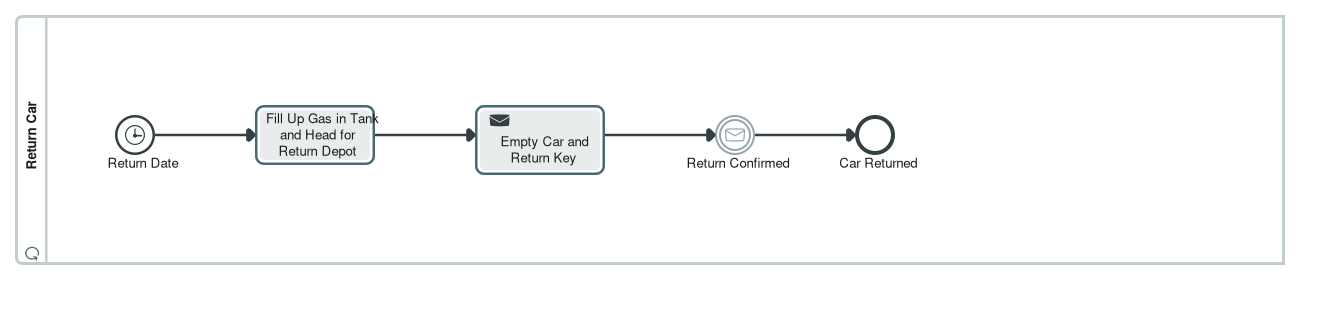
The customer's perspective of the return process is shown in the Return Car diagram, which demonstrates the customer's actions including filling up gas, emptying the car, and returning the key.
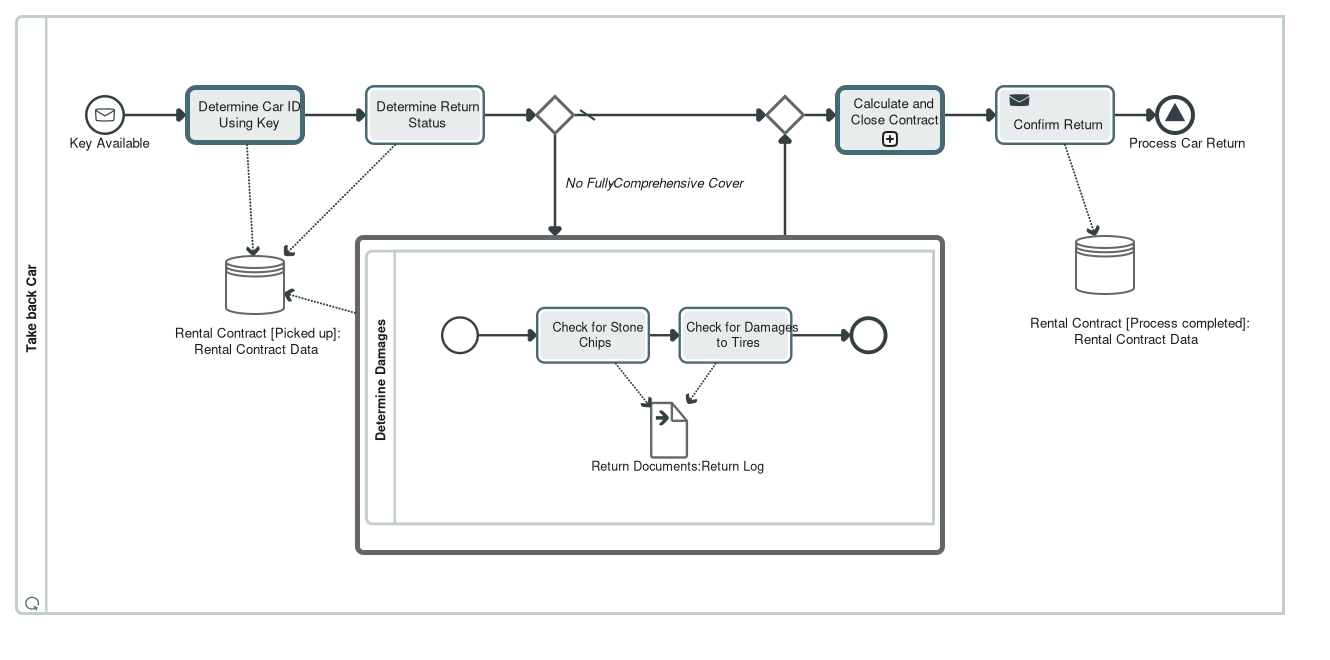
The rental company's perspective is shown in the Take back Car diagram, showing the company's process of confirming the return and issuing the confirmation receipt.
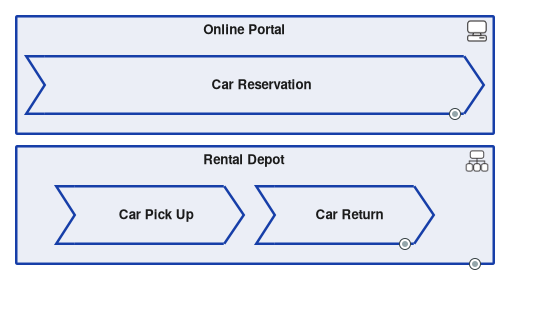
The overall rental process context, including the Car Return process, is illustrated in the Rental processes diagram.
Important Notes
- Fuel Policy: Avoid extra refuelling service charges by keeping your gas receipt and refilling to the agreed level (typically Full-to-Full)
- Damage Check: If you have not taken out fully-comprehensive cover, the car must be checked for damages and a damage report will be filled out
- Key Identification: The key's ID is used to identify the rental car in the system
- Confirmation: You will receive a return confirmation email as soon as the contract is finalized and closed
Process Flow
The return process involves interaction between the Renter (customer) and the Lender (rental company), as illustrated in the Rental processes diagram. The two sides are coupled by two main messages:
- Key (Physical) - The physical handover of the key triggers the company-side process
- Confirmation - The confirmation message lets the customer process continue and finish
⚠️ Too many information sources were retrieved for this goal. The response may be incomplete or less accurate. Consider narrowing down your focus or improving the search query to get more relevant results.
Condition for Required Damage Check
A damage check is required when the customer has not taken out fully-comprehensive cover (comprehensive insurance) with the rental contract.
This condition is explicitly documented in the process model as a branching point in the car return workflow:
Branching for optional damage check. Two outgoing flows. The conditional flow "No Fully-Comprehensive Cover" leads into the damage check and is weighted with a probability of 20 percent; its condition is held as the reusable logical expression "No Fully-Comprehensive Cover". The second flow is the default flow, weighted 80 percent, and skips the check by leading straight to the merge. The business rule behind this is the functional requirement "Contract without fully-comprehensive cover requires damage check".
Process Details
| Condition | Damage Check Required | Process Path |
|---|---|---|
| No Fully-Comprehensive Cover | Yes (20% probability) | Damage check → Contract settlement → Confirmation |
| Fully-Comprehensive Cover | No (80% probability) | Direct to contract settlement → Confirmation |
Damage Check Process
When the damage check is required, the rental company carries out an inspection that includes:
- Check for Stone Chips - The technician checks the car for stone chips, particularly on the windshield.
- Check for Damages to Tires - The technician checks whether there are any damages to the tires upon acceptance of the returned car.
The output of this process is a damages report that becomes part of the return data and is used in the invoice calculation.
Customer-Facing Information
From the customer's perspective, the rental company's guide states:
Full Protection Coverage: If you selected our Fully Comprehensive Cover, minor wear and damage inspections are streamlined so you can be on your way even faster!
This confirms that customers with fully-comprehensive cover experience a faster return process without the detailed damage inspection.
Process Diagrams
The damage check condition is illustrated in the Take back Car diagram, which shows the branching logic for the optional damage check.
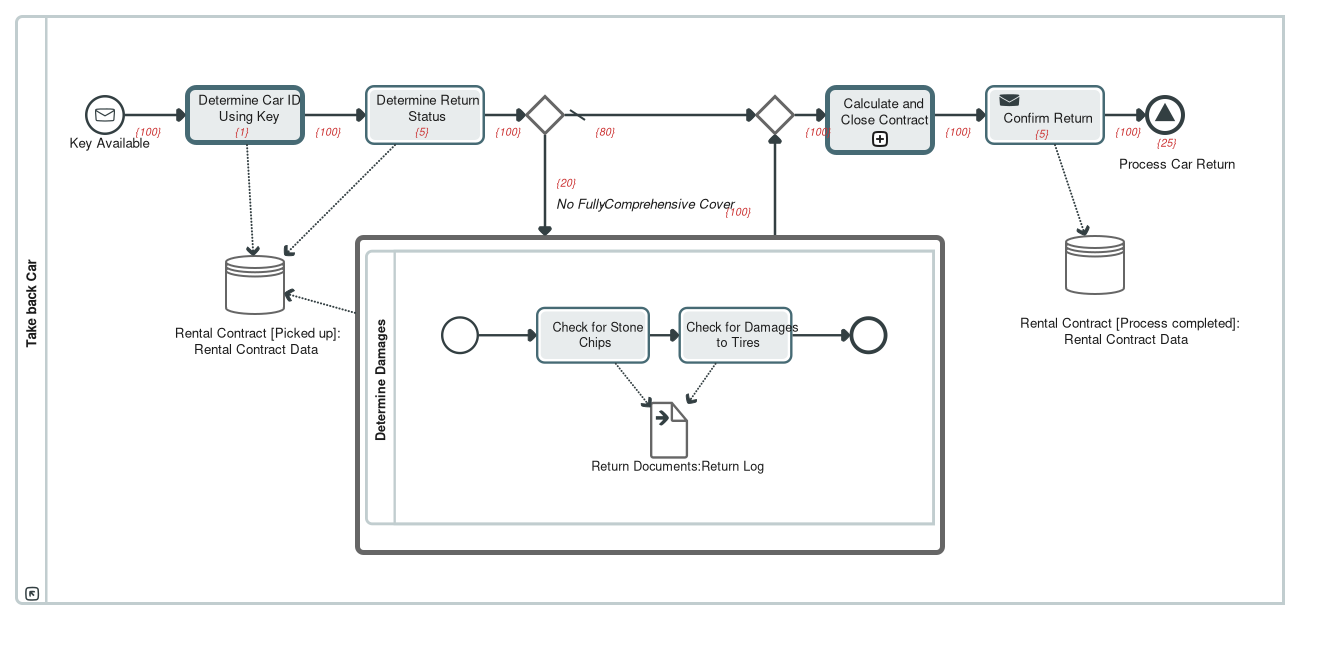
The activity-based costing view Drop-Off Car (Activity Based Costing View) provides economic evaluation of the return process, including the costs associated with the damage check path.
Summary
The specific condition requiring a damage check is: the customer has not taken out fully-comprehensive cover with the rental contract. This represents approximately 20% of all car returns and adds approximately 25 minutes and 5 EUR to the return process compared to the standard route without damage check.
Conceptual Difference Between 'Fahrzeug zurückgeben' and 'Fahrzeug zurücknehmen'
The two processes represent the customer's perspective and the rental company's perspective of the same business interaction. They are two sides of a BPMN collaboration that describes how the return happens from both viewpoints.
1. Fahrzeug zurückgeben (Return Car) - Customer Perspective
This BusinessProcess encompasses all processes for returning a vehicle and realizes the business service "Fahrzeugrückgabe" used by the renter. It describes what the customer must do:
- Fill Up Gas in Tank and Head for Return Depot - The customer fills the tank as per the contract and then returns the car to the return depot
- Empty Car and Return Key - The customer removes all belongings and luggage and hands in the key at the return depot
- Wait for Return Confirmation - The customer waits for confirmation receipt of return so they can leave the return depot
2. Fahrzeug zurücknehmen (Take Back Car) - Company Perspective
This BusinessProcess encompasses the processes when taking back a vehicle and uses the application service "Fahrzeugmanagement". It describes what the rental company does:
- Determine Car ID Using Key - The employee enters the car ID by scanning the key ring or entering the ID manually
- Determine Return Status - Mileage is recorded and the car is checked as to whether it was returned with a full tank of gas
- Optional Damage Check - If the customer has not taken out fully-comprehensive cover, the car must be checked for damages
- Calculate and Close Contract - Process final financial settlement based on damages, fuel levels, and log return documents
- Confirm Return - Issue confirmation receipt of return for the customer
3. Collaboration Between Both Processes
The two processes are coupled by two main messages that cross the organizational boundary:
"Key (Physical)" runs from the customer's task "Empty Car and Return Key" to the start event ":Key Available" in the company pool. The physical handover of the key is therefore what triggers the company-side process.
"Confirmation" runs from the company's task "Confirm Return" to the customer's intermediate event ":Return Confirmed". Only this message lets the customer process continue and finish.
The diagram thus shows a clean handover pattern. The customer brings the car into a defined state, full tank and emptied, and hands over the key; the company accepts, inspects, settles and confirms. The two sides are coupled by these two messages only and otherwise run independently.
4. Process Diagrams
The customer's perspective is illustrated in the Return Car diagram.
The rental company's perspective is illustrated in the Take back Car diagram.
Summary Table
| Aspect | Fahrzeug zurückgeben | Fahrzeug zurücknehmen |
|---|---|---|
| Perspective | Customer / Renter | Rental Company / Lender |
| Business Service | Fahrzeugrückgabe (vehicle return service) | Fahrzeugmanagement (vehicle management service) |
| Primary Actions | Fill tank, empty car, return key | Check ID, inspect car, settle contract, confirm return |
| Trigger | Return Date event | :Key Available message event |
| End Event | :Return Confirmed (message catch) | :Process Car Return (signal end) |
Fahrzeug zurücknehmen (Diagram)
⚠️ Leaving thalabus
You are about to leave the platform and visit an external website:
Vehicle Return Guide for Customers
Quick, Simple, and Transparent Guidelines for Returning Your Rental Vehicle
1. Simple Steps to Return Your Car
Thank you for choosing our rental service! We aim to make your vehicle return as seamless as possible. Below is a brief summary of what you need to do before handing back the keys, along with what happens next.
2. Your Return Journey Diagram
| +---------------------------------------------------------------------------------+ | CUSTOMER RETURN PROCESS | +---------------------------------------------------------------------------------+ [ STEP 1: PREPARATION ] * Refill fuel tank or check charge level according to rental policy. * Remove all personal belongings from cabin, trunk, and glovebox. | v [ STEP 2: ARRIVAL AT DEPOT ] * Drive to designated Rental Depot drop-off zone on or before Return Date/Time. | v [ STEP 3: KEY RETURN ] * Hand over vehicle key to depot agent (or use secure key drop-box if after hours). | v [ STEP 4: JOINT CHECK & CONFIRMATION ] * Agent reviews vehicle state; you receive an instant Return Confirmation receipt. | v [ STEP 5: FINAL INVOICE & CLOSURE ] * Final contract summary and security deposit release sent via email. +---------------------------------------------------------------------------------+ |
3. Pre-Return Checklist
| Item / Step | Customer Action Required | Tips & Important Notes |
| Fuel / Charge | Refill fuel tank to agree-upon level (Full-to-Full) or charge EV. | Avoid extra refuelling service charges by keeping your gas receipt. |
| Personal Belongings | Empty cabin, door pockets, glovebox, and trunk. | Double check under seats and charging cables! |
| Key Handover | Return keys directly to staff or secure drop-box. | Late returns without notice may incur additional hourly fees. |
4. Our Inspection & Peace of Mind Commitment
Once you return the key, our team carries out a quick standard inspection:
Inspection Routine: We inspect tires, windshield (for stone chips), and bodywork to ensure the vehicle is safe and ready for the next customer.
Full Protection Coverage: If you selected our Fully Comprehensive Cover, minor wear and damage inspections are streamlined so you can be on your way even faster!
Instant Receipt: You will receive a return confirmation email as soon as the contract is finalized and closed.
…Message flows between the pools:
"Key (Physical)" runs from the customer's task "Empty Car and Return Key" to the start event ":Key Available" in the company pool. The physical handover of the key is therefore what triggers the company-side process.
"Confirmation" runs from the company's task "Confirm Return" to the customer's intermediate event ":Return Confirmed". Only this message lets the customer process continue and finish.
The diagram thus shows a clean handover pattern. The customer brings the car into a defined state, full tank and emptied, and hands over the key; the company accepts, inspects, settles and confirms. The two sides are coupled by these two messages only and otherwise run independently.
Take back Car (BPMN process diagram)
This diagram describes the car return from the rental company's point of view and is by far the most fully detailed process in the model. It is the only one carrying execution times, costs, responsibilities and cost centres throughout, which is also what makes the separate cost view "Drop-Off Car (Activity Based Costing View)" possible: that view shows the same process content under a cost perspective.
Trigger:
Message start event ":Key Available", described as "Event which shows that the key was returned." Expected volume: 3,000 occurrences per year.
Flow:
1. Key Exception. Described as "The employee enters the car ID. To do this, they scan the key ring or enter the ID manually." Execution time 2 minutes, 1 EUR per execution. The task is a call activity and calls the global task "Determine Car ID Using Key". Performed by the organisational unit Accept Car Return, charged to cost centre Customer Service. The data association "Return Data" feeds the data object "Car ID Contract".
2. Determine Return Status. Described as "Mileage is recorded and the car is checked and a note made as to whether the car was returned with a full tank of gas." Execution time 5 minutes, 5 EUR. Performed by Accept Car Return, cost centre Customer Service. The data association "Miles on Clock and Whether the Tank is Full" feeds the same data object.
3. Diverging gateway, described as "Branching for optional damage check." Two outgoing flows. The conditional flow "No Fully-Comprehensive Cover" leads into the damage check and is weighted with a probability of 20 percent; its condition is held as the reusable logical expression "No Fully-Comprehensive Cover". The second flow is the default flow, weighted 80 percent, and skips the check by leading straight to the merge. The business rule behind this is the functional requirement "Contract without fully-comprehensive cover requires damage check".
4. Determine Damages, only on the branch without fully-comprehensive cover. Described as "Carry out an initial damage report." Execution time 25 minutes, 5 EUR. The task is a call activity and calls the separate process "Determine Damages", which has its own diagram (section 3.4). It is the only task with two responsible units, Accept Car Return and Technical Maintenance, and two cost centres, Customer Service and Place of Damage.
5. Converging gateway, described as "Merging of the alternative paths."
6. Calculate and Close Contract. A call activity that calls the process "Calculate and Close Contract" described in section 3.3.
7. Confirm Return. Described as "Issue confirmation receipt of return for the customer." Execution time 3 minutes, 5 EUR, typed as a send task. Performed by Accept Car Return, cost centre Customer Service. This task is the source of the "Confirmation" message flow to the customer.
8. Signal end event ":Process Car Return". Described as "Send a signal to maintenance that the car can be prepared ready for a new customer." Budgeted at 15 minutes and 25 EUR and charged to cost centre Management.
Data:
The data object "Car ID Contract" accompanies the whole flow. Its description reads: "All contract data can be determined using the car ID. This is persistent data which is determined during the task of entering the car ID; this data can be added to throughout the process to include more information about the status of the return." It is backed by a data store definition of the same name and linked to the business object "Rental Contract".
Process path:
The diagram additionally records a named path, "Return with Damages Check", described as "Describes return of the car without fully-comprehensive cover, meaning a damages check needs to be carried out before return can be acknowledged." The path documents the variant through the optional check as a first-class model element rather than leaving it implicit in the branching.
Economic evaluation:
…Car Pick Up. Described as: the driver collects a car they have reserved. On collection, and after completing registration details, the driver only expects to have to show a driver's license, some form of identification and a credit card, so booking information must be easy to retrieve from the driver's identity.
Car Return. Described as: the driver is also the contract partner in consumer business, and the car is returned to one of the rental depots. The key's ID must be enough information to identify the car. If the customer has not taken out fully-comprehensive cover, the car must be checked for damages and a damage report filled out.
The BPMN diagrams described in section 3 detail exactly these stages.
Diagram descriptions
Return (BPMN collaboration diagram)
"Return" is the central collaboration diagram of the model, with 40 diagram members. Its recorded description reads: "Collaboration for return use case. BPMN is used here to describe how return happens from the view of the customer and/or driver and from the view of the rental company." It shows the car return as an interplay of two participants and thereby makes visible exactly where customer and rental company touch each other.
Participants (pools):
Customer, described as "The driver as participant in the collaboration." It references the process "Return Car", carries the partner role "Customer" and represents the actor "Customer".
Car Rental for Private Customers, which references the process "Take back Car". Its recorded description reads "The rental car as participant in the collaboration", although the pool stands for the rental company.
Flow in the Customer pool (process "Return Car", described as "Car return from the view of the customer", process type Non-Executable):
A timer start event ":Return Date" opens the process, described as "The process starts no later than the Return Date." The customer then performs "Fill Up Gas in Tank and Head for Return Depot" ("The customer fills the tank as per the contract and then returns the car to the return depot"), followed by the send task "Empty Car and Return Key" ("The customer removes all belongings and luggage and hands in the key at the return depot"). The customer then waits at the intermediate message catch event ":Return Confirmed", described as "The customer waits for confirmation receipt of return so they can leave the return depot; the process is then finished for the customer." The end event "Car Returned" closes the customer's part: "This is the last part of the process from the view of the customer."
Flow in the Car Rental for Private Customers pool (process "Take back Car"):
Starts at the message event ":Key Available" and runs through key acceptance, recording of the return status, an optional damage check, contract settlement and return confirmation to the signal end event ":Process Car Return". Section 3.2 covers this in detail.
Message flows between the pools:
"Key (Physical)" runs from the customer's task "Empty Car and Return Key" to the start event ":Key Available" in the company pool. The physical handover of the key is therefore what triggers the company-side process.
"Confirmation" runs from the company's task "Confirm Return" to the customer's intermediate event ":Return Confirmed". Only this message lets the customer process continue and finish.
The diagram thus shows a clean handover pattern. The customer brings the car into a defined state, full tank and emptied, and hands over the key; the company accepts, inspects, settles and confirms. The two sides are coupled by these two messages only and otherwise run independently.
Take back Car (BPMN process diagram)
This diagram describes the car return from the rental company's point of view and is by far the most fully detailed process in the model. It is the only one carrying execution times, costs, responsibilities and cost centres throughout, which is also what makes the separate cost view "Drop-Off Car (Activity Based Costing View)" possible: that view shows the same process content under a cost perspective.
Trigger:
Message start event ":Key Available", described as "Event which shows that the key was returned." Expected volume: 3,000 occurrences per year.
Flow:
…Technology services: Reservation, Car management, Damage Service, Accounting Service, Customer data, User Management.
Business objects: Rental Contract, Return Documents, Return Status, Damages Upon Return, Car, Key.
Data: 13 entities (Address, Car, Color, Customer, Damages, Driver's License, Lender, Make of Car, Model, Person, Place of Damage, Rental, Type of Damage), 58 entity attributes, and 28 database tables across the two physical database models.
Software: eight use cases (Booking a Car, Determine available cars, Gain customer, Implement booking, Car checkin, Car checkout, Assign rental transaction, Record damages), 14 Java classes, class diagrams for rental, data classes and service classes, state machines for Car and Customer.
Process landscape
The process map "Processes of the Rental Car Company" divides the company into three groups.
Management Processes: Strategy, Management System, Financial Planning, Marketing, Partner Management.
Core processes: Rental, Customer Management, Product Management, Fleet Management, Controlling, Human Ressources.
Supporting processes: Finance, Employee Management, Facility Management, Real Estate Management, Supplier Management.
The second process map, "Rental processes", breaks the core process Rental down into its three stages and relates them to the organisational unit Rental Depot and to the IT system Online Portal.
Car Reservation. Described in the model as: a private customer who will also be the driver reserves a car. Rental duration, the rental station for collection and return, the car class chosen from pictures of example cars, extras such as a navigation system or a child's car seat, payment details and personal details including an e-mail address all have to be entered, and a confirmation e-mail is sent to that address on successful reservation.
Car Pick Up. Described as: the driver collects a car they have reserved. On collection, and after completing registration details, the driver only expects to have to show a driver's license, some form of identification and a credit card, so booking information must be easy to retrieve from the driver's identity.
Car Return. Described as: the driver is also the contract partner in consumer business, and the car is returned to one of the rental depots. The key's ID must be enough information to identify the car. If the customer has not taken out fully-comprehensive cover, the car must be checked for damages and a damage report filled out.
The BPMN diagrams described in section 3 detail exactly these stages.
Diagram descriptions
Return (BPMN collaboration diagram)
"Return" is the central collaboration diagram of the model, with 40 diagram members. Its recorded description reads: "Collaboration for return use case. BPMN is used here to describe how return happens from the view of the customer and/or driver and from the view of the rental company." It shows the car return as an interplay of two participants and thereby makes visible exactly where customer and rental company touch each other.
Participants (pools):
Customer, described as "The driver as participant in the collaboration." It references the process "Return Car", carries the partner role "Customer" and represents the actor "Customer".
…